
TABLE OF CONTENTS
Experience the Future of Speech Recognition Today
Try Vatis now, no credit card required.
SDH subtitles are Subtitles for the Deaf and Hard of Hearing, a type of subtitle that includes not only dialogue but also important non-speech sounds like [door creaks] or [music playing]. They make video content fully accessible for viewers who can't fully hear the audio, and they matter even more now that 50% of Americans use subtitles most of the time and 80% of Gen Z do.
If you're a product manager, video producer, educator, or content creator, you've probably run into this moment. A team asks for “subtitles,” a platform asks for “SDH,” a broadcaster asks for “captions,” and suddenly a simple deliverable turns into a terminology problem with real workflow consequences.
That confusion is normal. The terms overlap in casual conversation, but they don't always mean the same thing in production. And if you choose the wrong format, you can end up with a file that looks fine in review but fails accessibility expectations, platform specs, or both.
Why Subtitles Are No Longer an afterthought
A viewer on a crowded train opens a video on their phone. Another viewer is following a recorded all-hands meeting from a shared office. A third is hard of hearing and needs the audio information in text form to follow the story at all.
Those are different viewing situations, but they point to the same reality. On-screen text isn't an extra anymore. It's part of how people watch.

Viewers expect text by default
A 2024 roundup from Kapwing reports that 50% of Americans use subtitles “most of the time,” rising to 80% among Gen Z, and that 80% of viewers are more likely to finish a video if it has subtitles. The same source also notes lifts in ad recall, ad memory quality, and brand linkage, which shows that subtitles affect understanding and retention, not just compliance (Kapwing subtitle statistics).
That changes the role subtitles play in production. They aren't only there for a small subset of viewers. They're part of the default experience across streaming, social clips, training videos, live event replays, and internal communications.
When people say they need subtitles, they often mean they need the content to survive real viewing conditions, not just language barriers.
For teams publishing sermons, events, or community broadcasts, that shift is easy to see. If you're planning recurring video delivery, it helps to explore church live streaming software that treats accessibility and viewer comprehension as part of the workflow instead of an afterthought.
Accessibility and convenience now overlap
SDH holds significant importance. Standard subtitles help when someone needs language support. SDH helps when someone needs the full audio experience translated into readable text.
That's a bigger job. If a documentary uses a sudden alarm, distant applause, or a change in speaker off camera, the viewer shouldn't lose that context just because they can't hear it.
A useful mental model is this: plain subtitles carry the spoken words. SDH carries the spoken words and the missing audio clues that make those words meaningful.
Defining SDH Subtitles
The simplest answer to “what are sdh subtitles” is this: they are subtitles designed for viewers who cannot fully hear the audio, and they include more than dialogue alone.
Think of ordinary subtitles as a transcript of speech. Think of SDH as a script with stage directions included.
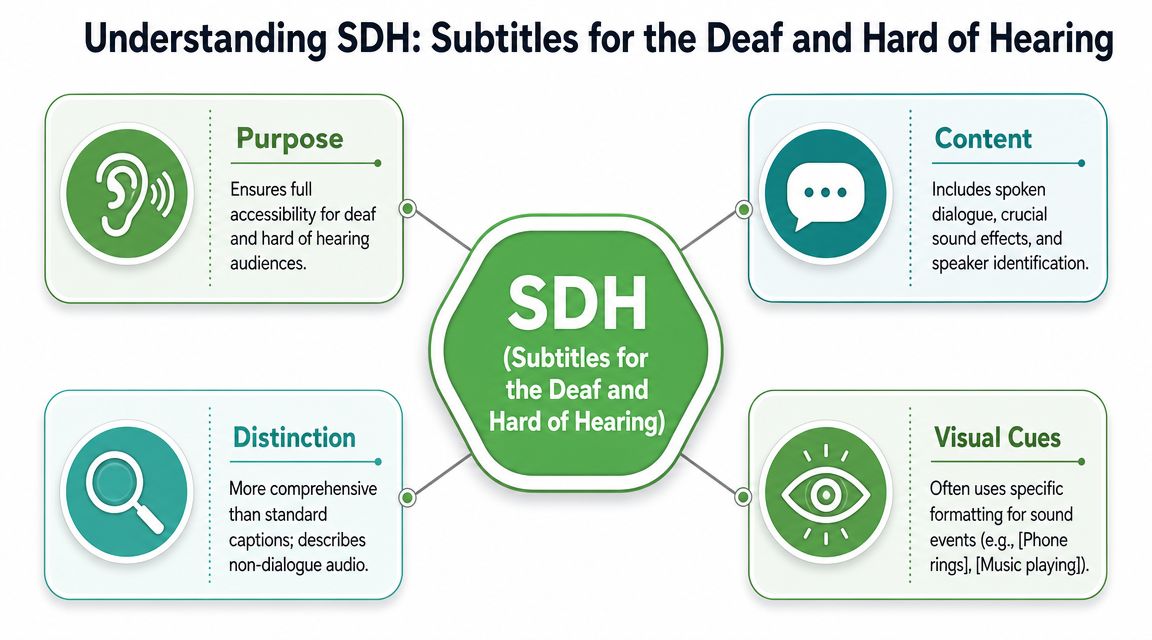
Core definition: SDH is a hybrid format. It looks like subtitles in digital delivery, but it serves the same accessibility purpose as closed captions by including speaker identification, sound effects, and music cues that traditional subtitles usually omit.
That description aligns with industry guidance summarized by ITC Global, which explains SDH as the point where subtitle styling and caption-style accessibility meet (ITC Global on SDH and closed captions).
What SDH usually includes
An SDH file commonly contains several layers of information:
- Spoken dialogue so the viewer can follow the words being said.
- Speaker identification when it isn't obvious who is talking.
- Sound cues such as [phone rings], [thunder rumbling], or [audience applauds].
- Music cues that communicate tone, such as [somber music] or [upbeat theme playing].
- Relevant on-screen text when needed for comprehension.
Here's a simple example.
| Audio moment | Standard subtitle | SDH subtitle |
|---|---|---|
| Off-screen voice says “Run!” while glass breaks | Run! | [glass shatters] [Maria] Run! |
| Character enters silently while eerie music plays | [eerie music playing] | |
| Two speakers argue from another room | Stop. / No. | [David] Stop. / [Elena] No. |
Why that extra detail matters
Without those cues, a viewer may understand the words but miss the scene.
A subtitle that only says “Run!” tells you the line. An SDH subtitle that says [glass shatters] [Maria] Run! tells you urgency, source, and cause. That's closer to the full experience hearing viewers receive automatically.
Netflix's partner guidance also treats subtitles as typically interlingual, while SDH and closed captions are intralingual assets for viewers who can't fully hear the audio. In other words, SDH isn't just “more detailed subtitles.” It's a different accessibility purpose.
The easiest way to remember it
Use this shortcut:
- Standard subtitles = what was said
- SDH = what was said + what was heard
- Closed captions = similar accessibility goal, often with different technical history and delivery context
That distinction sounds small until your team has to create, review, localize, and deliver these assets at scale. Then it affects everything from editorial review to export format.
SDH vs Closed Captions vs Standard Subtitles
Most production mistakes happen here. A team asks for “captions,” the vendor delivers translation subtitles, or a streaming platform wants SDH and receives a basic SRT with dialogue only.
The safest approach is to compare the formats by purpose first, then by packaging.
Feature comparison
| Feature | SDH (Subtitles for Deaf & Hard of Hearing) | Closed Captions (CC) | Standard Subtitles |
|---|---|---|---|
| Primary purpose | Accessibility for viewers who can't fully hear audio | Accessibility for viewers who can't fully hear audio | Language support or translation |
| Language relationship | Usually same language as source audio | Usually same language as source audio | Often different from source audio |
| Includes dialogue | Yes | Yes | Yes |
| Includes speaker identification | Yes, when needed | Yes, often expected | Usually no |
| Includes sound effects and music cues | Yes | Yes | Usually no |
| Typical styling | Subtitle-style timed text for digital delivery | Caption-style presentation, historically tied to broadcast systems | Simpler subtitle presentation |
| Viewer need addressed | Full audio access in text | Full audio access in text | Understanding speech in another language |
If you want a broader plain-English primer on the terminology gap, this comparison of closed captions vs subtitles is a useful companion.
Where people get tripped up
The terms aren't used consistently across regions. Netflix notes that in the UK, “subtitles” can refer broadly to on-screen text, while in the US and Canada, “subtitles” usually means language translation and SDH or CC are used for accessibility (Netflix partner guidance on subtitles, SDH, and CC).
That means the same request can mean different things depending on who asks for it.
A US streaming product manager might say:
“We need English SDH.”
A UK broadcaster might say:
“We need English subtitles.”
Both may be asking for an accessibility asset. Or they may not. You have to check the spec, not just the label.
The practical difference in real workflows
For a film trailer localized into Spanish, standard subtitles might translate only the spoken dialogue.
For an internal training video in English for employees who are deaf or hard of hearing, SDH or CC should preserve the meaningful sound layer too. If a warning tone sounds before a safety instruction, that belongs in the text.
This is why terminology isn't a cosmetic issue. It changes:
- Editorial scope, because someone must add non-speech information
- Review time, because speaker labels and sound cues need checking
- Delivery specs, because platforms may want a specific asset type
- Compliance choices, because the wrong file can miss accessibility needs
A good rule is to ask two questions before production starts:
- Is the viewer missing language or missing audio access?
- Which platform or market defines the deliverable?
Those two answers usually tell you whether you need standard subtitles, SDH, or closed captions.
Common SDH Formats and Delivery Standards
Once teams understand what SDH is, the next surprise is that there isn't one universal file format for it.
SDH is an accessibility function, not a single file type. The content may be SDH, but the container depends on where the asset is going.
Common formats you'll see
In day-to-day workflows, teams often encounter:
- SRT, a plain subtitle format used widely across web video and simple publishing tools
- WebVTT, common for browser-based players and web platforms
- TTML, a more structured timed-text format used in professional distribution workflows
A helpful starting point if you're sorting out web subtitle files is this guide to the VTT file format.
Why format choice isn't just technical trivia
A subtitle file can be perfectly written and still get rejected if it's packaged in the wrong format.
Subly notes that SRT and WebVTT are widely used for web content, but major distributors can impose stricter requirements. It gives a concrete example: Netflix requires TTML for SDH and timed-text deliveries and does not accept SRT or VTT files for that use case (Subly on SDH subtitles vs CC).
A useful way to think about formats is this. SDH is the message. SRT, VTT, and TTML are different envelopes. The wrong envelope can stop delivery even if the message inside is correct.
What teams should check before export
Before anyone clicks “download subtitles,” confirm these points:
- Platform acceptance. Does the destination accept SRT, VTT, TTML, or something else?
- Accessibility scope. Does the file include non-speech audio and speaker labels, or is it dialogue only?
- Styling rules. Some platforms care about line length, placement, or formatting conventions.
- Metadata expectations. Labeling a file “subtitles” when the platform expects “SDH” can create confusion downstream.
A common mistake is using a basic subtitle generator, exporting SRT, and assuming the job is done. That might be fine for a social clip uploaded directly to the web. It may fail for a streaming platform, broadcaster, or enterprise archive that requires a different packaging standard.
For product teams, this matters because subtitle generation isn't one task. It's three tasks: authoring the content, validating the accessibility layer, and packaging it for the destination.
Best Practices for Creating High-Quality SDH
Good SDH doesn't read like cluttered notes on a screen. It reads like a careful translation of the audio world into text.
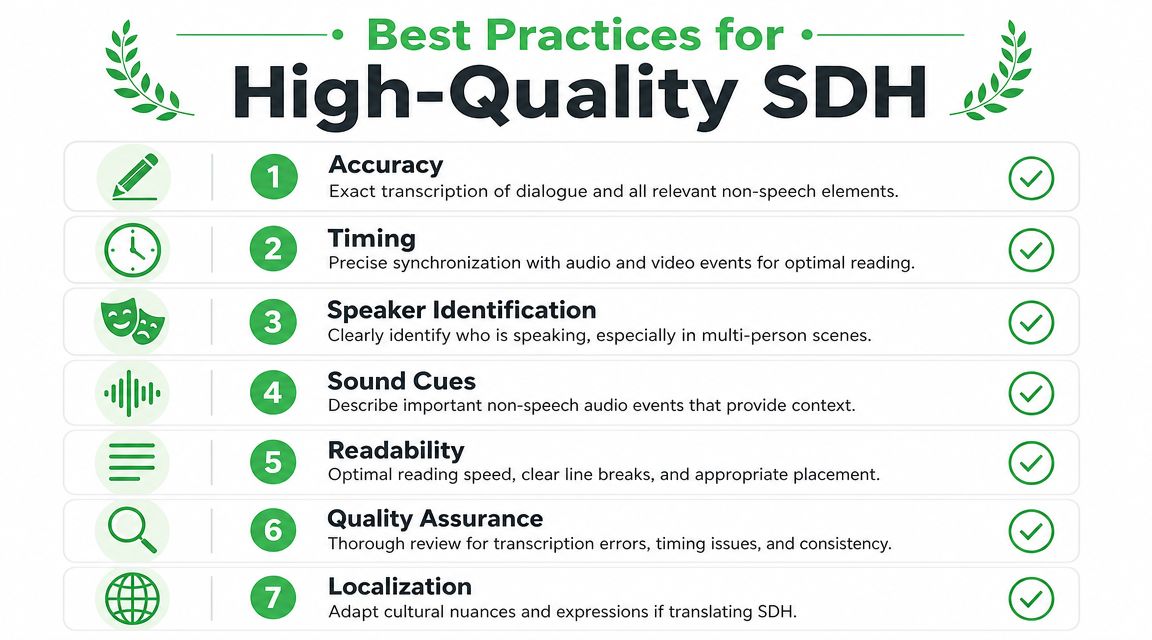
That takes editorial judgment. Sonix points out that proper SDH adds complexity because teams must handle not just dialogue transcription, but also accurate speaker identification and descriptions of non-speech audio, which increases the need for human review in scaled workflows (Sonix on SDH subtitles).
Write for comprehension, not for raw completeness
A common beginner mistake is over-describing every noise.
If a scene includes ambient office hum that adds nothing to meaning, you usually don't need to label it. But if a key sound changes the scene, such as a door being unlatched off screen, it should be included.
Use cues that are brief and specific:
Better: [sharp knock]
Weaker: [someone is probably knocking on the door]
Better: [soft laughter]
Weaker: [people in the room seem amused]
Practical rule: Include sounds that affect meaning, tone, action, or speaker understanding. Skip noise that doesn't help the viewer interpret the scene.
Keep speaker labels consistent
If multiple people speak, don't switch labeling styles mid-video.
Choose one approach and stick to it:
- [Maya] We should go now.
- MAYA: We should go now.
Consistency matters because viewers learn the pattern. Once they trust it, they can follow the conversation faster.
Time cues so they feel natural
SDH should appear when the audio event happens, not several beats later. If the subtitle lags behind the sound cue, the viewer gets the information too late.
That means editors need to watch for more than spoken words. They need to time:
- Sound-triggered events like alarms, footsteps, or applause
- Speaker changes in fast dialogue
- Music transitions that signal mood or scene changes
Protect readability on screen
Even accurate SDH fails if viewers can't read it comfortably.
Use these habits:
- Break lines at natural phrases. Don't split names, verbs, and objects awkwardly.
- Keep cues concise. Long sound descriptions slow reading.
- Avoid overloading a cue. If dialogue and sound compete in one subtitle, simplify where possible.
- Review on the actual screen type. Mobile playback exposes readability problems fast.
Build quality control into the process
The review pass shouldn't only ask, “Are the words correct?”
It should also ask:
| QA question | Why it matters |
|---|---|
| Is every important sound cue present? | Missing cues remove context. |
| Are speaker labels accurate? | Wrong labels confuse scene logic. |
| Do subtitles appear at the right moment? | Poor timing breaks comprehension. |
| Are cues short and readable? | Dense text overwhelms viewers. |
Professional SDH quality comes from this editorial layer. That's the part many teams underestimate when they assume subtitle creation is just speech-to-text.
Automating SDH Creation with AI Workflows
Manual SDH creation is possible. It just doesn't scale well when you publish often, manage multiple languages, or handle large media libraries.
That operational pressure is why the conversation has shifted. Amara describes the primary challenge as producing SDH at scale, noting that the hidden cost sits in human review of non-speech audio and speaker attribution, and that modern AI transcription platforms with built-in editors are becoming central to maintaining speed and consistency (Amara on SDH workflows and accessibility).
A practical SDH workflow
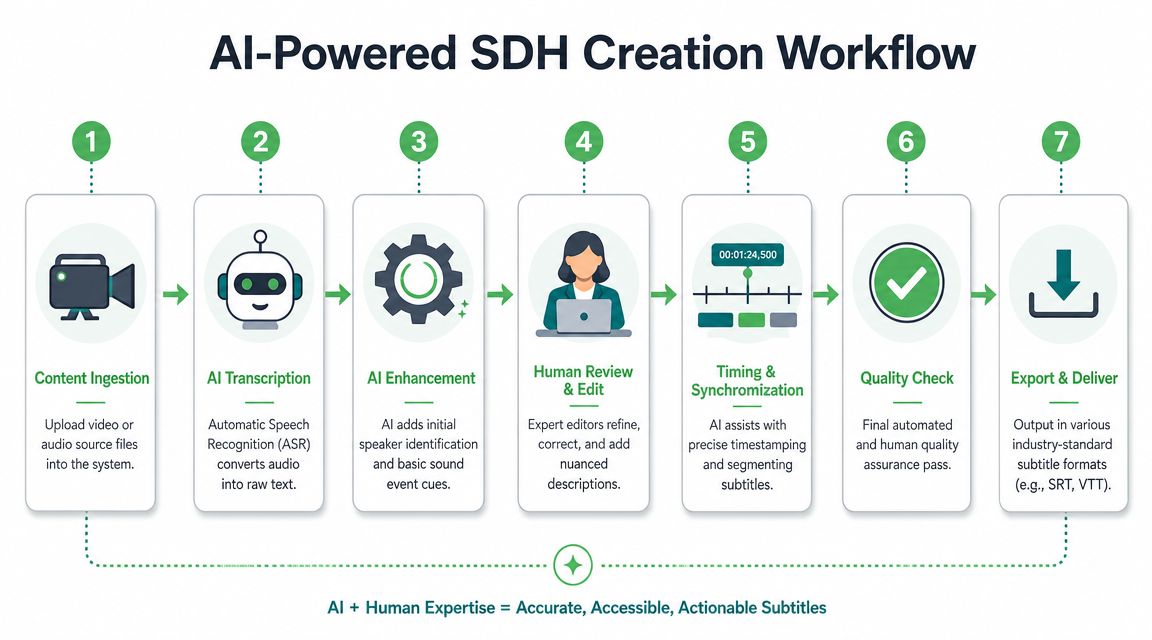
The most reliable approach is hybrid. Let AI handle the repetitive foundation, then let people handle nuance.
A workable pipeline looks like this:
- Start with automated transcription to generate time-coded dialogue.
- Use speaker diarization to separate who said what.
- Review the timeline in an editor and insert or refine non-speech cues like [music fades] or [crowd cheering].
- Export in the format the platform accepts.
- Run a final human QA pass focused on accessibility, not just spelling.
If you're working from existing video content, even something simple like learning how to copy transcript from YouTube can help teams bootstrap the first draft faster before proper SDH editing begins.
Where AI helps most
AI doesn't remove the need for judgment. It removes the slowest setup work.
For example, tools that generate transcripts, timestamps, and speaker-separated text give editors a structured starting point. From there, they can focus on the part machines still struggle with most consistently: deciding which sounds matter and how to describe them clearly.
If you want to understand the technical side of that first stage, this walkthrough of how automatic speech recognition works explains the pipeline behind transcript generation.
In practice, teams often use platforms like Vatis Tech to create editable transcripts with timestamps and speaker separation, then turn those into subtitle files such as SRT or VTT before a final SDH review and platform-specific packaging step.
The important shift is this: don't treat SDH as a last-minute formatting task. Treat it as a repeatable content operation with AI handling the base transcript and humans protecting accessibility quality.
If your team needs a faster way to turn audio and video into editable transcripts, subtitle files, and review-ready caption assets, Vatis Tech is worth a look. It fits well for teams that need time-coded transcription, speaker separation, and export options as part of a practical SDH workflow.