TABLE OF CONTENTS
Experience the Future of Speech Recognition Today
Try Vatis now, no credit card required.
A lot of teams search for a way to translate spanish to english by voice when the problem is already live.
An agent is on a customer call and can’t wait for a human interpreter. A producer is clipping a Spanish interview for an English audience. A healthcare operations team needs usable notes from spoken conversations, but can’t push sensitive audio through a consumer app and hope for the best.
That’s where voice translation stops being a convenience feature and becomes an operational system. The difference isn’t just speed. It’s whether the output is accurate enough to trust, structured enough to edit, and secure enough to use in a regulated environment.
Why Instant Spanish Voice Translation Matters
The business case is easy to see when a conversation stalls.
A customer explains a billing issue in Spanish. The agent understands only fragments. A newsroom receives a Spanish-language clip that needs fast review. A legal team has recorded testimony and needs an English version without losing who said what. In each case, delay creates risk.

Why this language pair is so important
Spanish to English isn’t a niche workflow. It sits at the center of customer support, media, public services, and cross-border operations.
Over 500 million native Spanish speakers worldwide and 41 million people in the US speak Spanish at home, according to the data summarized by AirApps on Spanish to English voice translation. The same source notes that Spanish-English accounts for 15-20% of translation queries on major platforms, and that modern AI systems have pushed performance to over 95% accuracy for many practical use cases.
That scale changes how teams should think about translation. It’s not an edge case to solve manually. It’s a recurring workflow that deserves proper tooling.
If you want a broader look at business translation workflows, this guide on https://vatis.tech/blog/spanish-to-english-translation is a useful reference point.
What changed in practice
Older voice translation tools often felt like a demo. You had to speak, stop, wait, and hope the result was close enough. That was acceptable for travel phrases. It wasn’t acceptable for contact centers, broadcasters, or compliance-heavy teams.
Today’s systems are far better at handling continuous speech, preserving sentence meaning, and producing text that can move into downstream workflows like subtitles, searchable transcripts, summaries, and case notes.
Practical rule: The value of voice translation isn’t the translation alone. It’s how quickly your team can act on the translated output.
That matters most when the conversation can’t pause. On a support call, delay hurts resolution. In media, delay slows publishing. In healthcare or legal operations, delay can affect documentation quality and review speed.
The teams that get the best results don’t treat translation as a magic button. They treat it as a speech pipeline with inputs, constraints, and review steps. That’s the difference between a rough transcript and something a business can practically use.
Translating Recorded Spanish Audio to English Text
For many teams, the first real use case isn’t live speech. It’s a recorded file.
That could be an MP3 from a support call, an M4A from a phone interview, a WAV from a hearing, or a video link that needs fast review. The safest workflow is to convert the Spanish speech into text first, then translate that text into English with timestamps and speaker turns preserved.

What the system is doing under the hood
There are two core stages.
First, Automatic Speech Recognition (ASR) produces a Spanish transcript. Then Neural Machine Translation (NMT) converts that transcript into English. Smartcat’s overview of the workflow notes that background noise or heavy accents can increase Word Error Rate by 15-30%, and that clean audio is critical for reaching the 95-99% accuracy modern systems can achieve on strong inputs, as described in Smartcat’s audio translation guide.
That’s why file prep matters more than many people expect.
A practical workflow for recorded files
Use this sequence when you need to translate spanish to english by voice from a recorded source:
Upload the cleanest source available
Prefer the original recording over a forwarded copy. Compressed files often lose speech detail, especially in quiet consonants and overlapping dialogue.Set the source language correctly
If the platform lets you choose Spanish explicitly, do it. Auto-detection is useful, but fixed language selection usually reduces confusion when the audio includes names, abbreviations, or code-switching.Generate the Spanish transcript first
This gives you a reviewable layer before translation. It’s much easier to spot mistranscriptions in the source language than to diagnose them after they’ve been translated.Turn on speaker labeling and timestamps
Speaker diarization matters when interviews, calls, or meetings include multiple voices. Timestamps matter when someone needs to jump back to the original audio.Review the first errors before exporting
Don’t skim only the English output. Check the Spanish transcript where the audio is hardest to hear. If the transcript is wrong there, the translation downstream will also be wrong.
What usually works and what usually fails
| Scenario | Likely result | Why |
|---|---|---|
| Clear single-speaker recording | Strong output | The ASR model has a clean signal and stable voice characteristics |
| Interview with orderly turn-taking | Good output with review | Speaker changes are manageable if diarization is enabled |
| Noisy café recording | Mixed output | Background noise masks phonetics and short function words |
| Multiple people speaking over each other | Weak output | Overlap breaks both transcription and speaker assignment |
Clean audio beats clever prompting every time.
File prep that pays off
- Reduce background noise: Even simple cleanup can improve transcription quality before translation starts.
- Keep speakers close to the mic: Distance creates echo and room coloration that speech models struggle with.
- Avoid mixed channels when possible: If one person is loud and the other is faint, the quieter speaker often suffers most in the transcript.
- Watch for regional vocabulary: Terms from Mexico, Spain, Argentina, or bilingual workplace speech may need review, especially in domain-specific material.
For business users, that’s enough to produce a dependable first draft. For analysts, editors, and case reviewers, the key is getting a transcript that keeps the original structure intact.
Mastering Real-Time Spanish to English Voice Translation
Real-time translation is a different animal.
A recorded workflow can tolerate a second pass. Live translation can’t. If your system is handling a support call, a meeting, a broadcast, or live monitoring, it has to recognize speech, translate meaning, and return usable English fast enough that the conversation still feels connected.

What makes live translation viable now
The turning point was the shift to end-to-end AI models that can work on streaming audio instead of waiting for a speaker to finish a whole segment.
According to Soniox’s Spanish speech technology overview, the speech translation market is projected to reach $5.8B by 2030, driven largely by real-time applications. The same source says new models now achieve word error rates below 5% on live streams, enabling mid-sentence translation rather than awkward stop-and-wait exchanges. It also notes practical outcomes such as contact centers cutting abandonment rates by 25% and broadcasters monitoring over 1 million hours of Spanish news daily.
That last point matters. Live systems aren’t just for conversation. They’re also for surveillance, compliance, moderation, and newsroom triage.
A good technical explainer on streaming transcription foundations is this ASR pipeline guide at https://vatis.tech/blog/how-automatic-speech-recognition-works-step-by-step-guide-to-the-asr-pipeline.
Where real-time translation works best
The strongest fit is where people need immediate comprehension, not literary perfection.
- Contact centers: Agents need enough fidelity to understand intent, policy questions, and next actions.
- Live broadcasts: Producers need fast translated text for monitoring, clipping, and subtitle workflows.
- Remote meetings: Cross-language collaboration improves when neither side has to pause after each sentence.
- Media monitoring: Analysts can scan spoken Spanish content in English without waiting for manual review.
Here’s a useful visual example of the live workflow in action.
The trade-offs that matter
Low latency is only useful if the output stays readable.
In practice, teams usually balance three variables:
| Priority | What it improves | What you may give up |
|---|---|---|
| Lower latency | Faster interaction | Less context for ambiguous phrasing |
| Higher context window | Better translation choices | Slightly slower output |
| Strong noise handling | Better performance in messy audio | More compute and tighter pipeline design |
If you’re evaluating a live system, test interruptions, accents, and fast turn-taking. Demo conditions rarely expose the failure points.
Another common mistake is assuming live translation should replace human review everywhere. It shouldn’t. It should handle the first layer of understanding, routing, monitoring, or subtitle generation. Then a person can step in where precision is critical.
That division of labor is where real-time systems deliver the most value.
How to Refine and Export Your Voice Translation
A raw translation is rarely the final asset.
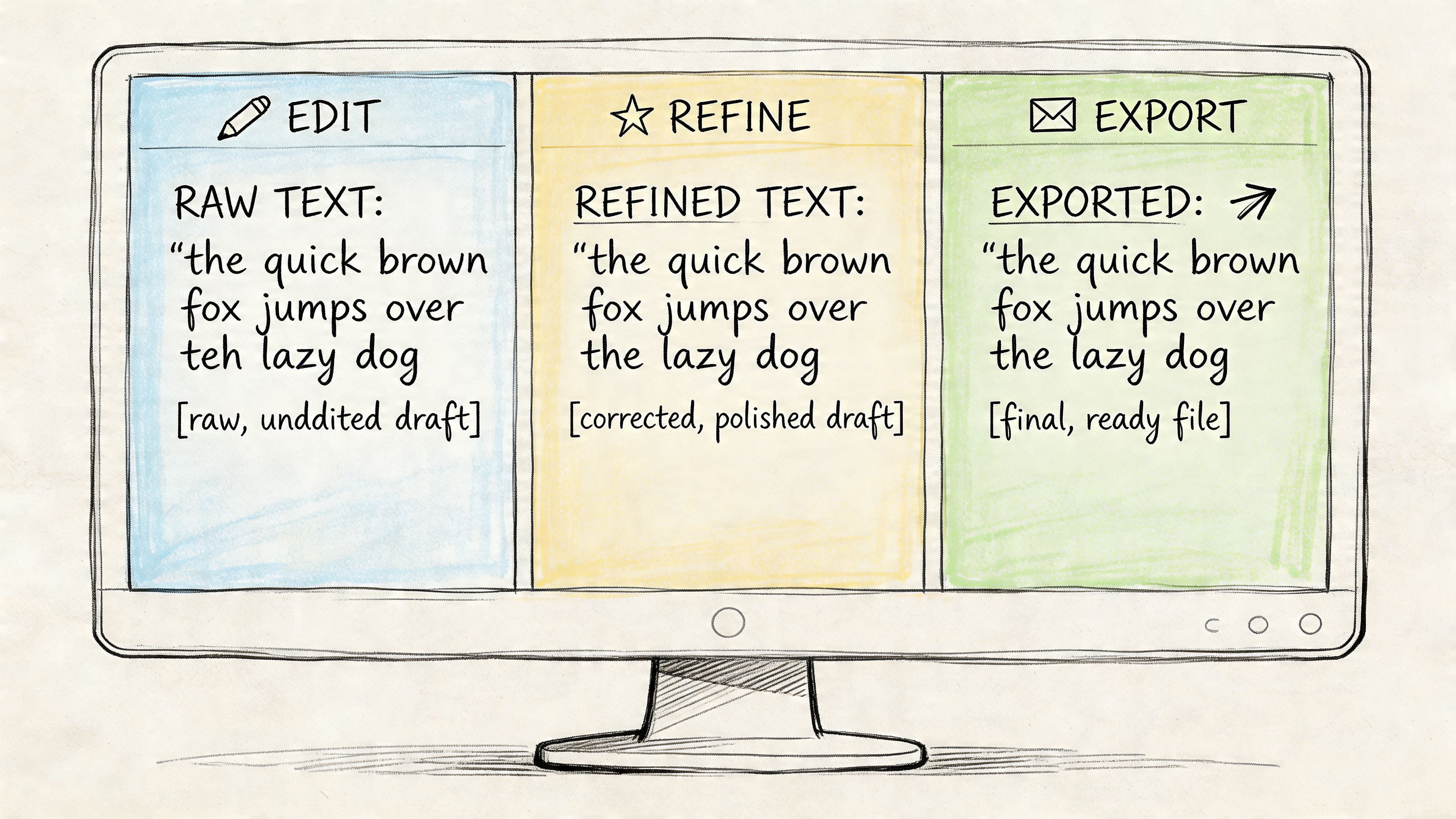
The moment the file lands in an editor, the job shifts from recognition to refinement. Teams then fix names, confirm speaker turns, smooth awkward phrasing, and export the result in the format that matches the next task.
What to review before you export
Start with alignment, not style.
If the wrong speaker is attached to a statement, or a timestamp drifts away from the audio, downstream users lose trust fast. In legal review, that creates confusion. In media, it slows edits. In internal operations, it makes search less useful.
A disciplined review pass usually includes:
- Speaker names: Replace generic labels with real roles or names when known.
- Terminology corrections: Brand names, product terms, medical language, and place names often need manual confirmation.
- Timestamp checks: Sample a few segments against the source audio, especially around quick exchanges.
- Translation smoothing: Fix literal phrasing that is technically correct but unnatural in English.
Don’t aim for perfect prose first. Fix attribution and timing first, then polish language.
Pick the export based on the next user
Teams waste time when they export everything as plain text.
The better approach is to match the format to the workflow that follows.
Vatis Tech Export Formats and Use Cases
| Format | Primary Use Case | Key Feature |
|---|---|---|
| DOCX | Meeting notes, legal review, editorial editing | Easy collaborative editing in standard document tools |
| TXT | Raw analysis, search indexing, archives | Lightweight plain text with minimal formatting |
| Shareable review copy | Fixed layout for distribution | |
| SRT | Video subtitles | Timecoded captions for most video platforms |
| VTT | Web video captioning | Web-friendly caption format with timing support |
A simple last-mile workflow
For most professional teams, this pattern works well:
Review the transcript and translation side by side
This helps you catch whether a translation issue came from the ASR layer or the language conversion layer.Confirm names and domain terms
This is especially important in healthcare, legal, customer service, and news.Export two versions when needed
One for human reading, such as DOCX or PDF, and one structured version, such as TXT or subtitle format, for systems and publishing tools.Keep the original audio linked to the edited transcript
When someone disputes a phrase later, the fastest resolution is a clickable path back to the source.
This is the point where translated speech becomes usable business output rather than machine output.
For Developers Integrating a Voice Translation API
If you’re building this into a product, the workflow changes again.
You’re no longer choosing buttons in a web interface. You’re deciding how audio enters your system, when translation happens, how to handle retries, where to store transcripts, and what security controls wrap the entire path. That means the API matters more than the demo.
A useful starting point for capability planning is the https://vatis.tech/products/speech-to-text-api page, especially if you need both file-based and streaming support.
What to build for first
Teams generally should begin with one of two patterns.
The first is batch processing for uploaded calls, interviews, or videos. The second is streaming ingestion for live sessions. Trying to support both on day one usually slows delivery unless your product already has a mature audio pipeline.
These are the decisions that matter most:
- Input type: File upload, URL ingestion, microphone stream, or telephony stream.
- Translation timing: Immediate live output or transcript-first processing after recording ends.
- Metadata needs: Speaker labels, timestamps, sentiment, topics, or entity extraction.
- Vocabulary control: Can you inject names, acronyms, product SKUs, or legal and medical terminology?
- Compliance boundary: What data is stored, for how long, and under which deployment model?
Why custom vocabulary matters
General models are strong, but they don’t know your world.
A contact center has plan names and scripted phrases. A hospital has clinical terminology. A newsroom has recurring public figures and place names. If you don’t add domain vocabulary, the engine may produce phonetically plausible but operationally wrong output.
That’s where developer controls pay off. You’re not just translating speech. You’re constraining ambiguity in a way the business can use.
Basic integration examples
A batch request in Python often looks conceptually like this:
import requestsurl = "YOUR_API_ENDPOINT"headers = {"Authorization": "Bearer YOUR_API_KEY"}files = {"file": open("spanish_call.mp3", "rb")}data = {"source_language": "es","target_language": "en","enable_speaker_diarization": "true","enable_timestamps": "true"}response = requests.post(url, headers=headers, files=files, data=data)print(response.json())A JavaScript example for an uploaded file follows the same pattern:
const formData = new FormData();formData.append("file", audioFile);formData.append("source_language", "es");formData.append("target_language", "en");formData.append("enable_speaker_diarization", "true");formData.append("enable_timestamps", "true");fetch("YOUR_API_ENDPOINT", {method: "POST",headers: {"Authorization": "Bearer YOUR_API_KEY"},body: formData}).then(res => res.json()).then(data => console.log(data));For streaming, the architecture matters more than the snippet. You need chunking, partial hypotheses, reconnect logic, and a clear policy for when partial translations become final. If you skip that design work, live UX gets messy fast.
Security belongs in the integration plan
A surprising number of engineering teams treat speech as if it were less sensitive than text. In regulated environments, it’s often more sensitive because the raw audio contains identity, emotion, and context.
If your team is mapping threat models and application controls, developing secure applications with AI is a useful companion read. It helps frame why AI features need the same security discipline as any other production system.
The cleanest API integration is the one that limits exposure. Send only the audio you need, store only the artifacts you need, and log only what helps you operate the service.
That mindset usually leads to better architecture, not just better compliance.
Security and Compliance in Professional Voice Translation
Many guides often prove inadequate.
They explain how to upload a file and get an English result, but they don’t ask whether the audio contains protected health information, legal testimony, customer payment details, or internal business conversations. For professional teams, that omission is the whole story.
The adoption barrier isn’t only model quality. It’s trust.
Why consumer tools create risk
A translation app may be fine for travel phrases or casual use. It’s a poor default for regulated work unless the provider clearly documents encryption, data handling, retention controls, auditability, and deployment options.
According to the enterprise gap described in Notta’s discussion of audio translation and compliance concerns, a 2025 Gartner report found that 68% of enterprises cite data privacy as the top barrier to adopting speech-to-text APIs. The same source notes that many online tools don’t address GDPR alignment, ISO 27001 certification, or PII redaction, which leaves major gaps for healthcare and legal teams.
That matches what practitioners see in the field. Security questions usually arrive before procurement ever asks about features.
What professional buyers should ask
Use this checklist before approving any system that will translate spanish to english by voice in a business setting:
- Encryption controls: Is audio protected in transit and at rest?
- Privacy posture: Does the vendor clearly address GDPR-aligned handling and deletion controls?
- Certifications: Is there credible evidence of security governance such as ISO 27001?
- Sensitive data handling: Can the platform redact personally identifiable information in transcripts?
- Deployment flexibility: Is private cloud or on-premise available when policy requires it?
- Operational assurances: Are there enterprise SLAs, access controls, and audit-friendly workflows?
For teams publishing translated captions, accessibility obligations matter too. This guide to video captioning laws and accessibility acts is a solid reference when legal and accessibility requirements overlap.
Security isn’t an add-on feature in voice AI. It’s the condition that determines whether the workflow is usable at all.
In healthcare, legal, government, and enterprise support, that’s the real dividing line. If a platform can’t explain how it protects spoken data, it doesn’t belong in production.
If you need a platform built for high-accuracy transcription, multilingual voice workflows, developer APIs, and enterprise-grade security, Vatis Tech is worth a close look. It’s designed for teams that need more than a consumer translator, including contact centers, media operations, healthcare, legal, and product teams building speech-enabled applications.