

TABLE OF CONTENTS
Experience the Future of Speech Recognition Today
Try Vatis now, no credit card required.
You’re probably looking at this because voicemail keeps creating small delays that turn into real workflow problems.
A client calls while you’re in a meeting. A patient leaves details after hours. A producer sends a time-sensitive update while your phone is on silent. You can see the missed call, but you can’t always listen right away. What you need is the message in text, fast, and without a messy setup.
On Android, there isn’t one universal answer. Some phones can transcribe voicemail inside the dialer. Some carriers push you into their own visual voicemail app. Some users bypass carrier voicemail entirely with Google Voice. And if you’re building a product or internal workflow, you may need your own transcription pipeline instead of any consumer app.
The practical question isn’t just “what’s the best voicemail to text app android option?” It’s which method gives you the right mix of privacy, accuracy, cost, and control for the way you work.
Why Reading Voicemails is a Game Changer
Reading voicemail changes the response window.
A sales rep can scan a message between meetings. A clinic manager can confirm a patient detail without playing audio in a waiting room. A field technician can check an address while standing on a noisy job site. In all three cases, text is easier to review, search, and act on than a 45-second recording.

The benefit is not just speed. It is control.
Text makes voicemail usable in places where audio is awkward or impossible. It also gives you a record you can copy into notes, search later, or forward to a teammate without asking them to listen through the whole message. For anyone handling recurring customer calls, service requests, or after-hours updates, that small shift changes how voicemail fits into daily work.
There are trade-offs, and they matter. Native transcription inside the dialer is usually the easiest path and often the best for privacy because fewer apps touch the message. Carrier tools can be convenient, but support varies and features can disappear when you switch plans or devices. Third-party apps add flexibility and cross-device access, yet they often route messages through another cloud service, which raises privacy and compliance questions. Custom API-based setups give teams the most control, but accuracy tuning, audio cleanup, storage, and redaction all become your problem.
What changed on Android
Android voicemail transcription used to feel like an add-on. On many devices now, it is built into the calling experience or available through the carrier’s visual voicemail stack. That shift matters because people use features that live inside the phone app. They ignore features that require extra setup, another inbox, and another account.
Support is still inconsistent. Two Android phones on the same version can behave differently because the dialer app, carrier provisioning, region, and voicemail backend all affect what shows up.
The three practical paths
Most Android users end up choosing from three approaches:
- Built-in Android or carrier voicemail tools. Best for low setup, familiar controls, and a cleaner phone-first experience.
- Third-party apps like Google Voice, YouMail, or Voxist. Better if you need transcripts on multiple devices, more storage, or a workaround for limited carrier support.
- Custom development with an API. Best for teams that need searchable archives, message routing, redaction, CRM sync, or tighter control over where audio and transcripts are stored.
The right choice depends on what you are optimizing for. Convenience is not the same as privacy. Accuracy is not the same as control. Free is not always cheap once you count missed details, manual review, or the engineering time needed to build a reliable pipeline.
Activating Native Voicemail Transcription on Android
You miss a call in the middle of the day, glance at the notification, and need the message in text form before your next meeting starts. Native voicemail transcription is the first place to check because it is usually the fastest path from missed call to readable message, with fewer apps, fewer logins, and fewer places where audio gets copied.
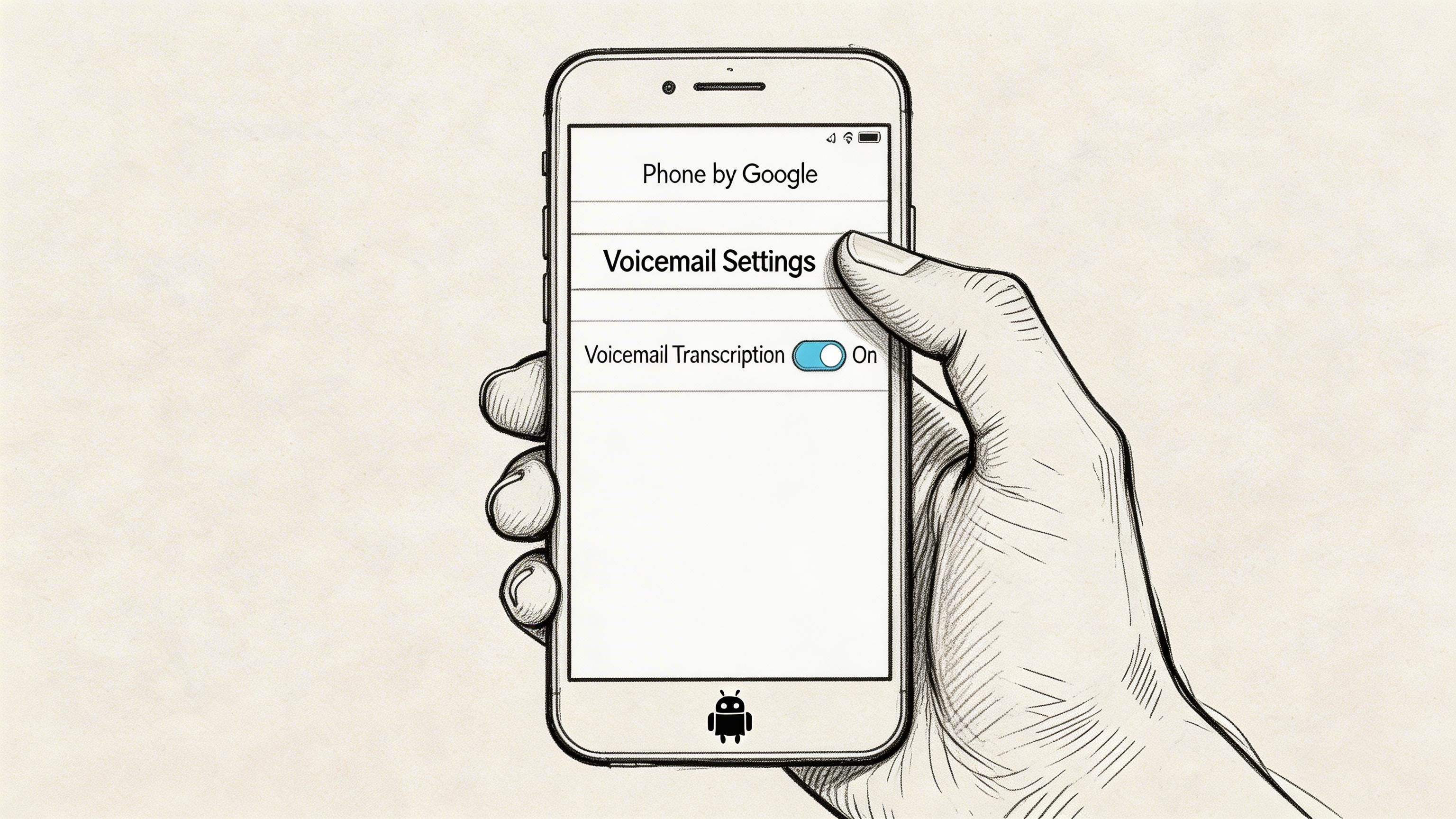
It also has the clearest trade-off profile. If transcription happens inside the dialer or through a tightly integrated carrier voicemail service, setup is easier and message access feels quicker. The trade-off is that support varies by phone model, carrier provisioning, and region, and privacy depends on where the audio is processed. A feature that looks native on screen may still rely on carrier or cloud infrastructure behind the scenes.
Start with the Phone by Google app
On a Pixel, or any Android phone using Google’s dialer, check here first:
- Open Phone by Google
- Tap the menu
- Go to Settings
- Open Voicemail
- Look for Voicemail transcription
- Turn it on if the toggle is available
Then open the Voicemail tab and select a message. If your device, carrier, and voicemail backend all support transcription, the text appears under the playback controls.
If the toggle is missing, the problem is usually not user error. In practice, one of three things is blocking it: the carrier has not enabled visual voicemail on the line, the manufacturer replaced Google’s voicemail flow with its own, or the feature is disabled in your region.
Samsung, Motorola, and carrier app variations
Samsung causes the most confusion because the voicemail experience changes across models and carriers.
Some Galaxy phones handle voicemail inside the default phone app. Others depend on a carrier visual voicemail app, and transcription may be limited to specific plans or postpaid accounts. Motorola is similar. Two phones that look almost identical can expose different voicemail settings because the carrier firmware package is different.
Use this check order instead of guessing:
| Where to look | What to check |
|---|---|
| Phone app | Voicemail tab, individual message screen, voicemail settings |
| Carrier visual voicemail app | Transcription option, account status, plan eligibility |
| Accessibility settings | Live Transcribe settings, only if you are checking related speech features |
| App updates | Updates for the Phone app, carrier services, and visual voicemail app in Play Store |
That last row matters more than people expect. I have seen voicemail transcription appear after an app update with no Android version change at all.
Why native usually wins on convenience
Native transcription keeps voicemail where people already look. That lowers the odds that messages sit unheard because someone forgot to open another app or complete another sign-in step.
It is also the lowest-maintenance option for many users. There is no separate inbox to manage, no forwarding rules to debug, and fewer permission prompts. For a personal phone or a small business line that only needs basic read-and-reply convenience, that simplicity often matters more than advanced features.
There are limits. Native tools usually give you less control over retention, export, search, and integrations. If you need transcripts pushed into a ticketing system, CRM, or internal archive, the built-in path starts to feel restrictive quickly.
Here’s a walkthrough if you want to see the setup flow visually:
Privacy and accuracy trade-offs to check before you rely on it
Native transcription is often the best starting point for privacy, but it is not automatically private in the strict sense.
- On-device processing keeps more data on the handset, which is usually the better fit for privacy-sensitive use.
- Carrier-integrated voicemail may store or process audio on carrier systems even if the transcript appears inside the phone app.
- Cloud-backed transcription inside a dialer can still be convenient, but it changes the data handling story.
- Third-party apps add another vendor, another storage location, and another permissions layer.
Accuracy also varies with the source audio. Native transcription handles clear speech well enough for routine use, but voicemail is full of bad speakerphone recordings, accents, names, account numbers, and background noise. If those details matter for legal, medical, or customer support workflows, test with real messages before standardizing on the built-in option.
Keep “Send usage data” off if the phone is shared, regulated, or used for sensitive client communication.
If native voicemail transcription is available and reliable on your line, start there. If it is missing, inconsistent, or too limited for your workflow, create a Google Voice account before you jump to paid apps or custom development.
Using Google Voice for Free Cross-Device Transcripts
You miss a client call on your Android phone, then try to check the voicemail from a laptop an hour later. Carrier voicemail often makes that harder than it should be. Google Voice fixes that specific problem well. It puts audio and transcripts in one cloud inbox you can reach from Android, iPhone, tablet, or browser.
That convenience comes with trade-offs. Google Voice is free for many personal use cases, but the transcription is cloud-based, so privacy-sensitive teams need to weigh convenience against data handling rules. Accuracy is usually good enough for routine callback triage, yet names, account numbers, and noisy messages still need a manual listen before anyone treats the transcript as a record.
The two setup paths that matter
Google Voice works best in one of two configurations.
The first is a new Google Voice number for a side line, intake line, or small business front door. This is the faster option and usually the safer one if you do not want to disturb an existing mobile setup.
The second is a ported primary number. That gives you one voicemail system instead of juggling carrier voicemail and Google Voice, but it takes planning around porting, forwarding, and account ownership. If you are starting from scratch, use this guide to create a Google Voice account before you change call routing.
Where Google Voice fits better than carrier voicemail
Google Voice is useful when the problem is access, not just transcription. The inbox is searchable, messages sync across devices, and web access is much better than what many carrier voicemail systems offer.
It also gives developers and operations teams a cleaner place to review messages before deciding whether they need a paid phone system or a custom workflow. If you are comparing broader speech tools beyond voicemail, this list of audio to text converters for different use cases is a useful contrast, because voicemail transcription has different constraints around call routing, retention, and caller identity.
A practical setup flow
A clean Google Voice rollout usually looks like this:
- Install the Google Voice app and sign in with the Google account that will own the voicemail history.
- Claim a new number, or confirm the porting plan before changing anything on the carrier side.
- Set up call forwarding and voicemail routing carefully. Misconfigured forwarding is the most common reason messages end up in the wrong inbox.
- Leave test voicemails from another phone with a full name, a callback number, and some background noise.
- Check the transcript in both the Android app and the web inbox, then listen to the audio and compare.
That last step matters. A transcript that looks acceptable on a quiet test call can fall apart on real customer voicemails.
Pros, limits, and hidden costs
Google Voice does a few things very well:
- Cross-device access from app and browser
- Searchable voicemail history
- Lower dependence on carrier voicemail features
- A low-cost way to centralize voicemail for a small team
Its limits are just as important:
- Transcripts live in Google’s cloud, which may not fit regulated or confidential workflows
- Accuracy drops on poor audio, accents, proper names, and numbers
- Porting and forwarding can get messy if your mobile carrier setup is already complicated
- Advanced automation and compliance controls are limited compared with business phone platforms or custom API-based systems
For many Android users, Google Voice is the practical middle ground. It costs little or nothing to try, works across devices, and solves the "my voicemail is trapped on one phone" problem better than many carrier tools. If privacy rules are strict or transcript accuracy has legal or operational consequences, treat it as a convenience layer, not the final source of truth.
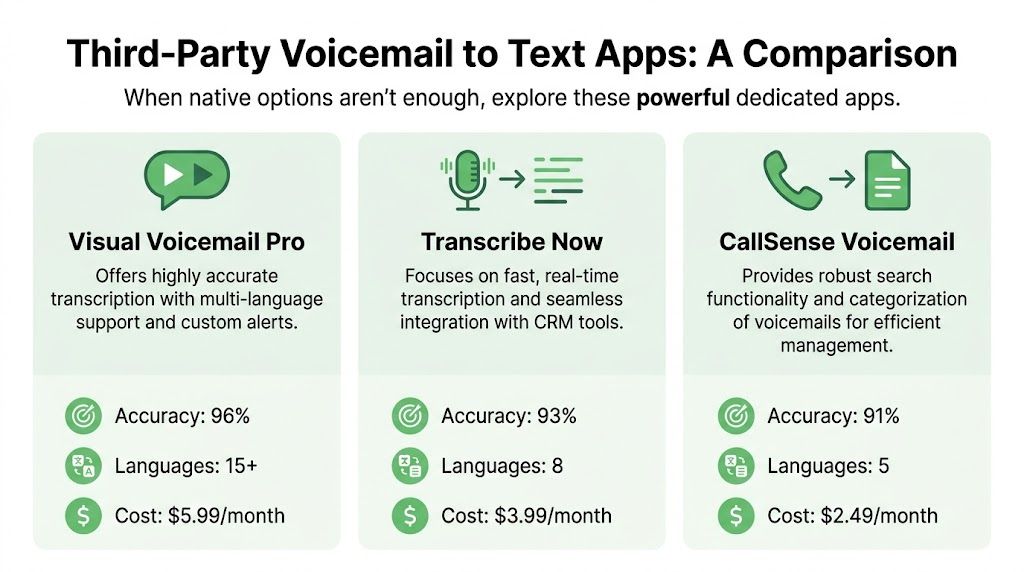
Comparing the Best Third-Party Voicemail to Text Apps
Once native transcription falls short, third-party apps become more interesting. That usually happens for one of three reasons. Your carrier support is patchy, you need better language coverage, or the built-in transcript quality isn’t good enough for real work.
Premium business-grade tools can make a noticeable difference. According to Robotalker’s comparison of voicemail transcription services, premium services like RingCentral, Dialpad, and Google Voice for Business deliver 90-95% transcription accuracy, while most free or basic apps sit around 80-85%, especially when voicemail contains background noise, accents, or technical terminology.
What separates a decent app from a useful one
A lot of voicemail apps promise the same thing. In practice, the differences show up in edge cases.
- Accuracy under stress matters more than perfect demos. Noisy, accented, or technical voicemails expose weak engines quickly.
- Language coverage matters if your callers switch languages or leave multilingual messages.
- Workflow features like forwarding, search, summaries, and spam filtering often matter more than the transcript itself.
- Storage model matters if you need to keep records, export messages, or review transcripts on desktop.
The Android guide from With Allo points out that YouMail and Voxist support 70+ languages, which is a meaningful advantage for multilingual teams handling inbound calls across markets.
Voicemail to Text Android App Comparison 2026
| Method | Best For | Estimated Accuracy | Key Feature | Cost |
|---|---|---|---|---|
| Native Android or carrier voicemail | Users who want the simplest setup | Strong when supported natively | Built into dialer or carrier app | Often bundled with device or plan |
| Google Voice | Personal use and cross-device access | Good for everyday voicemail | Web and app inbox syncing | Free with Google account |
| YouMail | Users who want voicemail management features | Varies by audio quality | Smart voicemail handling and extra call tools | Paid tiers available |
| Voxist | Multilingual users | Varies by setup | Broad language support | Paid tiers available |
| RingCentral or Dialpad | Business and contact center workflows | 90-95% in the cited benchmark range | Business integrations and stronger ML transcription | Premium service |
If you’re comparing broader speech tools beyond voicemail apps, this Vatis Tech roundup of audio to text converters including free options helps frame where voicemail transcription sits within the broader array of transcription tools.
The hidden trade-offs
Free apps are fine for convenience. They’re less fine when one wrong name or digit creates downstream work.
Business services justify themselves when voicemail is part of an operational process, not just a personal inbox. Think intake lines, production desks, healthcare callback queues, or legal client communications.
The best app isn’t the one with the longest feature list. It’s the one that creates the fewest corrections after the transcript lands.
That’s also why some teams stop looking for a perfect consumer app and move toward custom integrations instead.
Troubleshooting Common Transcription Problems
Most voicemail transcription problems aren’t caused by the app alone. They usually come from one of two sources. Bad audio in, or broken provisioning around the carrier and voicemail layer.
If your transcript says “unavailable,” arrives half-complete, or mangles names and numbers, treat it like a pipeline issue instead of a settings issue.
When the audio is the real problem
The hardest part of voicemail transcription is that voicemail audio is often poor before any transcription engine touches it.
The available research doesn’t disclose reliable audio-quality thresholds for the headline accuracy claims many services advertise. A review summary published by Rev specifically leaves key prerequisites undisclosed, noting the gap around acceptable noise levels, minimum audio duration, speaker clarity, and device microphone effects in this discussion of voicemail transcription app limitations.
That means you should be skeptical of clean-room accuracy claims when your real voicemails include:
- Muffled callers
- Road noise or office chatter
- Speakerphone distortion
- Fast delivery of names or digits
- Overlapping voices
If you also work with multilingual or translated voice workflows, this guide on how to accurately translate voice and audio files is a useful companion because the same audio quality problems usually show up again during translation.
Fixes that actually help
Try the least glamorous fixes first. They solve more problems than app switching does.
- Replay against the waveform if your app shows one. Short bursts of unclear speech often hide around the beginning or end.
- Use audio as the source of truth for names, callback numbers, and addresses.
- Ask repeat callers to slow down in your greeting if voicemail quality affects business operations.
- Export and reprocess critical voicemails in a stronger transcription workflow when the native transcript is obviously weak.
If you want a cleaner way to judge transcript quality, this Vatis Tech explainer on word error rate in speech to text gives a practical lens for evaluating what “good enough” really means.
Carrier and compliance issues people miss
The second failure point is interoperability.
A carrier may support visual voicemail but not transcription on your specific plan. A phone model may show the voicemail tab but hand off actual processing to a carrier service with different rules. A third-party app may store transcripts in the cloud without matching your compliance requirements.
A gap summary published by TicNote highlights this well. Existing guidance often notes failure reasons like “Carrier doesn't support it on your plan or line” and “Visual Voicemail isn't provisioned,” but it usually doesn’t bring together carrier policy, storage implications, and regulated-use concerns in one place.
A quick diagnosis grid
| Problem | Likely cause | Best next step |
|---|---|---|
| No transcript option | Carrier or plan limitation | Check carrier app, then consider Google Voice or another app |
| Transcript unavailable | Poor audio or delayed processing | Replay audio, wait, then export if needed |
| Wrong names and numbers | Audio compression or unclear speech | Verify manually against audio |
| Privacy concern | Cloud storage by app or carrier | Prefer native or on-device options when possible |
| Inconsistent behavior after switching carriers | Provisioning and voicemail migration gaps | Reconfirm setup and retention expectations |
Don’t trust voicemail text blindly when the message contains legal, medical, or payment details. Verify against the audio.
That one habit prevents most expensive errors.
For Developers Building a Voicemail to Text App
If you’re building your own voicemail to text app android workflow, consumer apps stop being enough pretty quickly. You need control over ingestion, language handling, transcript output, storage, and downstream actions.
That usually means treating voicemail as an audio-processing pipeline rather than a phone feature.
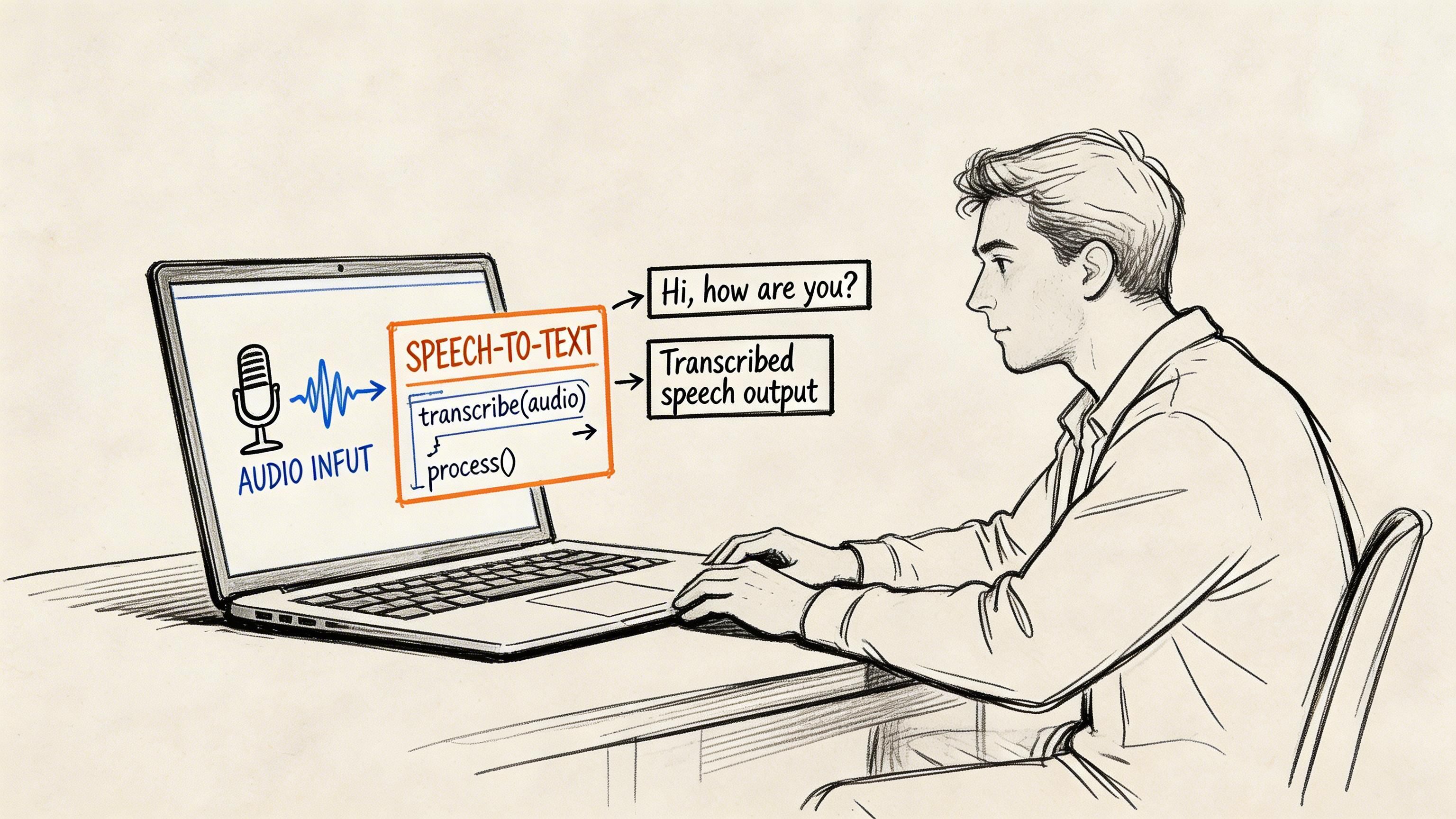
Build the pipeline in layers
A solid developer path looks like this:
- Capture voicemail audio from your PBX, SIP environment, forwarding rule, or exported file
- Normalize the file so your transcription layer gets consistent input
- Send audio to an ASR service
- Post-process the transcript for timestamps, speaker labels, redaction, or routing
- Store both audio and text so users can verify edge cases later
The architecture matters as much as the model. This step-by-step breakdown of how automatic speech recognition works is useful if you’re designing beyond a basic upload-and-transcribe flow.
What to optimize for
For voicemail, the core questions are different from live meeting transcription.
You care about:
- Short, compressed audio
- Names, order codes, ticket IDs, and callback numbers
- Silence trimming and voice activity detection
- PII handling
- Fast review by agents or staff
The premium-service benchmark summarized by Robotalker also describes a practical optimization path for business voicemail systems: capture the full audio through PBX integration, pre-process with voice activity detection, apply custom vocabulary for domain terms, then run cloud ASR with optional diarization, entity extraction, and redaction. That’s the right mental model if your use case is operational rather than casual.
Example API call pattern
Here’s a simple Python example showing the shape of a voicemail transcription request. Replace the endpoint and payload to match the API you use:
import requestsapi_key = "YOUR_API_KEY"files = {"file": open("voicemail.wav", "rb")}data = {"language": "en","speaker_diarization": "false","custom_vocabulary": "Acme Health, TMS-42, GCP-AI-Prod"}headers = {"Authorization": f"Bearer {api_key}"}response = requests.post("https://api.example.com/transcribe",headers=headers,files=files,data=data)print(response.json())What usually breaks first
Developers tend to underestimate review workflow.
Transcription is only half the feature. Users also need to:
- compare text against audio,
- correct proper nouns quickly,
- forward the transcript,
- and keep retention rules clear.
If users can’t verify the transcript against the original voicemail in one screen, support tickets usually follow.
That’s why the best custom builds treat voicemail transcription as a product workflow, not just an API response.
Choosing the Right Voicemail to Text Path
The right choice depends on what you value most.
If you want simplicity, start with native Android or your carrier’s visual voicemail. If transcription is available and reliable, it’s the least disruptive route.
If you want free cross-device access, Google Voice is still the cleanest workaround when native support is weak or inconsistent.
If you need better features or business-grade accuracy, paid voicemail platforms make more sense than forcing a free app into a serious workflow.
If you need control, compliance, or integration, build around an API and keep the transcript tied to your larger communication stack.
The trade-off is straightforward. Native tools usually win on convenience and privacy. Premium services often win on accuracy and workflow features. Custom builds win on control.
If your team needs more than basic voicemail transcription, Vatis Tech gives you a practical path from manual review to production-ready speech workflows. You can transcribe voicemail, calls, and other audio into editable text, then layer on diarization, summaries, translation, redaction, and API-based automation for contact centers, healthcare, legal, media, and product teams.