
Rated 4.9/5 by our users
TRUSTED BY HUNDREDS OF FAST-GROWING COMPANIES






MP4 is the default video format for most phones, cameras, screen recorders, and video platforms — and Vatis Tech's MP4 to text converter is built specifically for it. Upload your MP4 file and our AI extracts the audio, transcribes every spoken word, and delivers a complete transcript with timestamps and speaker identification.
Whether your MP4 is a Zoom recording, a lecture capture, a YouTube download, or a phone video, our converter handles it. The AI recognizes speech even with background music, ambient noise, and multiple speakers. Need subtitles for your MP4? Export the transcript as an SRT or VTT file and upload it to YouTube, Vimeo, or your video editor. Need a written summary? Our AI generates one in seconds.
You can also convert your MP4 to PDF, a feature that's useful for creating written records of video content. The transcript is formatted with timestamps and speaker labels, then exported as a clean PDF document that's easy to share, archive, or print. It's the fastest way to turn video meetings and presentations into permanent written records.
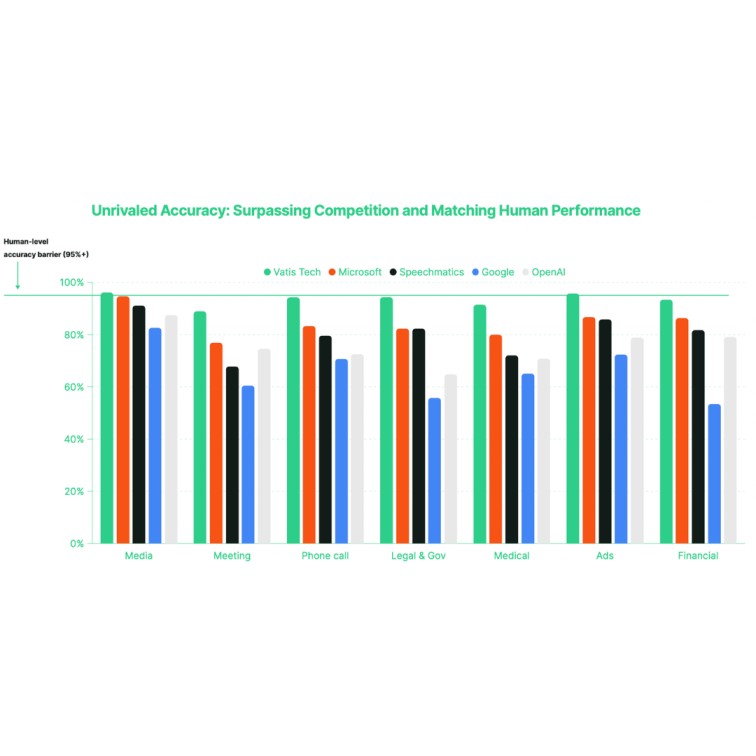
98%+ accuracy is not a marketing number. We benchmark our models datasets weekly. When we say 98%, we mean it. Our LLMs are trained on diverse audio (accents, background noise, crosstalk) because real conversations aren't recorded in a studio.
Convert any video to text in minutes. Upload an MP4, MKV, AVI, or MOV file and Vatis Tech's AI extracts every spoken word into an accurate, timestamped transcript. Speaker diarization automatically labels who said what. Ideal for turning lectures, webinars, interviews, and meetings into searchable text.

Our video to text converter processes videos of any length. A 1-hour video is fully transcribed in about 1 minute. We support 50+ languages and can handle videos where speakers switch between languages mid-conversation the AI detects the change and transcribes each segment in the correct language automatically.


Edit, export, or add subtitles. Review the transcript in our editor. Export as TXT, Word, PDF, or SRT/VTT subtitles for your video platform.
Here's a comparison between Vatis and other transcription tools.
Our users are people who value clarity, speed, and intelligence :)


Can’t find the answer you're looking for? Reach out to our Support team.

We support all major video formats: MP4, MKV, AVI, MOV, WebM, WMV, FLV, and MPEG. Video files can be up to 5GB and 10 hours long.
We achieve around 90% accuracy, similar to a human transcription service. Improve your transcripts even further by editing for perfect results within our platform.
Yes! Get started with 60 minutes of free transcription to try our accurate and user-friendly software. Take advantage of our automatic transcription technology by starting your free trial today.
Our speech recognition software makes it easy to search for keywords and edit your text directly. This helps you find, review, and refine important information quickly.
Yes, we include timestamps with your transcript. This helps you pinpoint specific moments in the original audio or video file.
Follow these tips for top-notch results: Record with good quality equipment, speak clearly and minimize background noise, use a microphone suitable for speech recognition. If recording multiple speakers, keep them at a consistent distance from the microphone.
No. Our converter handles MOV files natively. Just upload the MOV file directly, no format conversion needed. Converting to MP4 would add an unnecessary step and could reduce quality.
Yes. iPhone videos are saved as MOV files. Upload the MOV file from your Photos app, iCloud Drive, or AirDrop it to your computer. Our converter transcribes it with 98%-99%+ accuracy.

Read the documentation, try for free, tell us how it goes.

With a little obsession on quality, we made Vatis fast, accurate, and actually enjoyable to use. Then decided to share it with the world.
Made with ❤️ and ☕ in Europe 🇪🇺
Powering transcribevideototext.com with transcription software and API.


.svg)


